

Admin control for SSO prompts in Windows
Back in 2024, Microsoft rolled out a prompt that asks end-users to confirm authentication via SSO. You can read more about that here.
This change was made so Microsoft would be compliant with the EU’s Digital Markets Act (DMA). If a device’s region is set to an EU country, chances are you have been getting these additional SSO prompts ever since. Most of you reading this who have seen them probably find them rather annoying. It wasn’t really SSO anymore, more like MSO (Multiple-Sign On)? Ok, I just made that up right now, but you get what I mean.
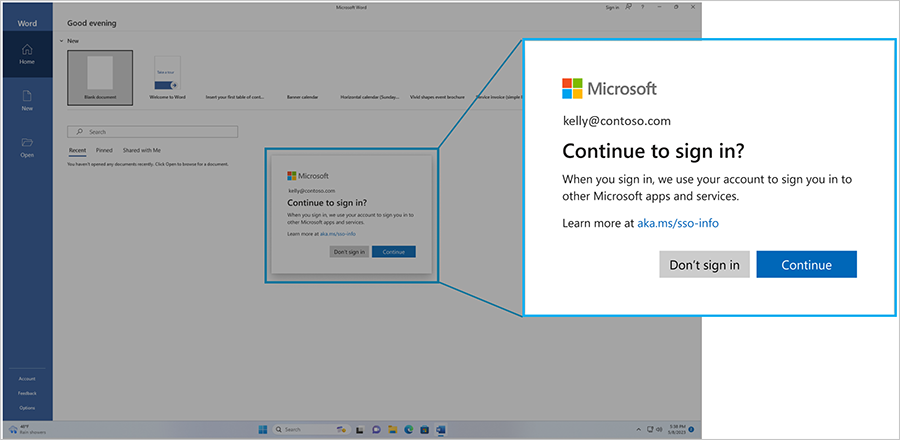
I can’t count the number of support tickets I logged on behalf of my customers back in 2024, mainly for shared-device scenarios. It was a bit of a mess. Some of it got fixed, but other scenarios were just “working as designed”.
Some 2½ years later, enterprise administrators finally get a policy option to suppress the SSO prompt. To quote the Microsoft docs:
“For managed enterprise environments, some organizations wanted additional flexibility to manage the SSO prompt experience on devices where their organizations already manage sign-in policies and trust relationships. To support those scenarios, we’ve developed a registry-based control that lets IT administrators automatically accept SSO permissions on eligible managed Windows devices.”
Policy to suppress the SSO prompt
Microsoft recently published a blog post about the new policy option that allows you to suppress the SSO prompt. You can read it here.
The short version:
- Starting with the July 2026 patch for Windows 11 24H2 and 25H2, we can now suppress the SSO prompt
- It can be deployed via GPO or as a registry key using a PowerShell script:
Registry path: HKLM\SOFTWARE\Policies\Microsoft\Windows\AAD
Value: AutoAcceptSsoPermission (DWORD) = 1
There is currently no Intune Settings Catalog option to set this policy as of this date - I previously mentioned a settings catalog option, but it turned out it was an incorrect policy space that was not related. See the official docs for this setting here - You can also find a remediation to set it using Intune from my Intune github repo.
Wrapping up
These SSO prompts have certainly been an annoyance over the years, and they seemed so redundant. Microsoft also received a fair bit of slack when they started rolling it out, but what a lot of people seemed to miss back then was that this was a necessary step for Microsoft to become compliant with EU guidelines.
It’s nice that we finally have an option to suppress it in enterprise environments, and I guess this will be one of those “core” policies that ends up deployed in most environments.
That’s all for now, have a great day :)