<?xml version="1.0" encoding="utf-8"?><feed xmlns="http://www.w3.org/2005/Atom" ><generator uri="https://jekyllrb.com/" version="3.10.0">Jekyll</generator><link href="https://evil365.com/feed.xml" rel="self" type="application/atom+xml" /><link href="https://evil365.com/" rel="alternate" type="text/html" /><updated>2026-02-27T12:09:11+00:00</updated><id>https://evil365.com/feed.xml</id><title type="html">Welcome to the land of everything Microsoft Intune!</title><subtitle></subtitle><author><name>Mads Johansen</name></author><entry><title type="html">EPM and MSI Shenanigans</title><link href="https://evil365.com/epm/EPMandMSI-Shenanigans/" rel="alternate" type="text/html" title="EPM and MSI Shenanigans" /><published>2026-02-27T00:00:00+00:00</published><updated>2026-02-27T00:00:00+00:00</updated><id>https://evil365.com/epm/EPMandMSI-Shenanigans</id><content type="html" xml:base="https://evil365.com/epm/EPMandMSI-Shenanigans/"><![CDATA[<p>I recently faced an issue at one of my customers where a smaller amount of users reported they had no free disk space, even though they barely had any apps installed or documents stored locally.</p>
<p>If you have been using Microsoft EPM for a while, then spoiler alert: You might also be (unknowingly) affected by this problem.</p>

<p><img src="/assets/images/2026-02-27-EPMandMSI-Shenanigans/Thumbnail.png?raw=true" alt="Thumbnail" title="Thumbnail" /></p>

<h2 id="locating-the-problem">Locating the problem</h2>

<p>I jumped on a users device, where the disk space had mysterially disappeared, and a first glance I couldn’t find out where the disk space had disapeared off to, so I had to fire up treesize to see what was going on.</p>

<p><img src="/assets/images/2026-02-27-EPMandMSI-Shenanigans/Treesize.png?raw=true" alt="Treesize" title="Treesize overview" /></p>

<p>Looks like the following path was stuffed with MSI Files - More specifically 319GB of MSI Files: <code class="language-plaintext highlighter-rouge">C:\Windows\System32\Config\systemprofile\AppData\Local\MDM</code></p>

<p><img src="/assets/images/2026-02-27-EPMandMSI-Shenanigans/MSIFile.png?raw=true" alt="MSI" title="EPM MSI Files" /></p>

<p>After examining a few of the MSI Files, it was clear that it’s an EPM MSI. Examining EPM logs on the device showed that it was stuck in an update loop. It kept failing with error 1603 (Fatal error.) It seems EPM, or more specifically, the CSP/Provider that EPM uses to update the EPM Agent, is not cleaning up after itself. There might also be an underlying issue causing the MSI to fail with 1603, but nevertheless, it should know how to clean up after itself when things go wrong, to avoid this scenario.</p>

<p>I also wanted to check if more users had this problem, so I wrote a remediation / detection script only, to check if that MDM Folder was above 1GB, and if it was, it would return with issue. I also made sure that it would print the total disk space of the folder to the Intune console, to see how bad it really was, and boy it found some really bad ones. In the worst cases there was over 300GB of EPM MSI Files stuck in that folder. Luckily, the issue had only seem to hit a small percentage of their devices so far. But these types of issues can easily snowball very fast, and will impact end-users productivity.</p>

<p><img src="/assets/images/2026-02-27-EPMandMSI-Shenanigans/DiskSpace-remediation-output.png?raw=true" alt="Diskspace" title="Diskspace output" /></p>

<h2 id="the-fix">The fix</h2>

<p>I’ve already engaged the EPM team at Microsoft, and they are looking into the problem. But while we are waiting for a permanent fix, I’ve written a remediation to clean up the folder. It’s a very simple detection script that simply checks the size of the folder, and if it’s above 1GB in size, it will proceed to remediation, where the remediation script cleans up all the files if the folder.</p>

<p>You can find the scripts <a href="https://github.com/thisisevilevil/IntunePublic/tree/main/Remediations/Fix%20high%20diskspace%20consumption%20in%20MDM%20Folder">here</a>.</p>

<p>You actually also re-use this script and point it to any other folder i.e: temp folders etc. and have them clean it up if it gets above a certain size. In the detection script, adjust the folder variable and also decide how much the threshold (in GB) should be, before it proceeds to clean up the folder. Then in the remediation script, also make sure to adjust that folder accordingly.</p>

<h2 id="the-end">The end</h2>

<p>I’m sure this bug will be fixed in due time by Microsoft, and luckily it doesn’t seem like the issue is that widespread, otherwise I’m sure a lot more would have come forward by now.</p>

<p>That’s all for now folks. Have an awesome day! :)</p>]]></content><author><name>Mads Johansen</name></author><category term="EPM" /><category term="Microsoft Intune" /><category term="Endpoint Management" /><category term="Microsoft EPM" /><category term="Disk space management" /><summary type="html"><![CDATA[I recently faced an issue at one of my customers where a smaller amount of users reported they had no free disk space, even though they barely had any apps installed or documents stored locally.]]></summary></entry><entry><title type="html">When Removing VBScript Breaks Your AMD Chipset Driver</title><link href="https://evil365.com/vbscript/VBScript-Deprecation/" rel="alternate" type="text/html" title="When Removing VBScript Breaks Your AMD Chipset Driver" /><published>2026-02-03T00:00:00+00:00</published><updated>2026-02-03T00:00:00+00:00</updated><id>https://evil365.com/vbscript/VBScript-Deprecation</id><content type="html" xml:base="https://evil365.com/vbscript/VBScript-Deprecation/"><![CDATA[<p>I recently noticed that my <strong>AMD X870 chipset drivers</strong> had been stuck “installing” via AMDs auto-updater for <em>weeks</em>—yet never actually finishing.</p>

<p>After ignoring it long enough, I finally decided to troubleshoot it. Those drivers <em>had</em> to be updated.</p>

<p>So I manually downloaded the installer and launched it… only to be greeted with this:</p>

<blockquote>
  <p><strong>“This installer is intended to be deployed only on an AMD system. Existing installation as the requirement is not satisfied.”</strong></p>
</blockquote>

<p><img src="/assets/images/2026-03-02-VBScript-Deprecation/AMDChipset-Error.png?raw=true" alt="Error" title="Error" /></p>

<p>Unless someone broke into my house and secretly replaced my motherboard and CPU with Intel hardware, something was clearly wrong.</p>

<h2 id="following-the-trail-with-process-monitor">Following the Trail with Process Monitor</h2>

<p>I fired up <strong>Process Monitor</strong> to see what the installer was doing behind the scenes.<br />
Almost immediately, I spotted repeated attempts to launch: <code class="language-plaintext highlighter-rouge">C:\Windows\SYSWOW64\cscript.exe</code>
<img src="/assets/images/2026-03-02-VBScript-Deprecation/ProcessMonitor.png?raw=true" alt="Error" title="Process Monitor" /></p>

<p>This can only mean 1 thing: <strong>VBScript.</strong></p>

<h2 id="the-root-cause">The Root Cause</h2>

<p>Three months ago, I had removed VBScript support from my device.<br />
At the time, it seemed harmless—another legacy component retired.</p>

<p>It turns out AMD’s chipset installer still uses <strong>VBScript-based requirement checks</strong>.<br />
With VBScript removed, those checks fail silently, and the installer incorrectly assumes the system is <em>not</em> an AMD platform.</p>

<p>In short: <strong>No VBScript → broken detection logic → false hardware error.</strong></p>

<h2 id="why-this-is-a-bigger-problem">Why This Is a Bigger Problem</h2>

<p>VBScript is living on borrowed time.</p>

<p>Microsoft has officially announced that:</p>

<ul>
  <li><strong>VBScript will be deprecated in 2027 - FoD will be disabled by default</strong></li>
  <li>It will later be <strong>fully removed from Windows</strong></li>
</ul>

<p>That means every installer, automation script, and macro that still depends on it, is a future outage waiting to happen.</p>

<p>If you believe no one in your organization relies on VBScript anymore, I dare you to try running this on a test device:</p>

<div class="language-powershell highlighter-rouge"><div class="highlight"><pre class="highlight"><code><span class="n">DISM</span><span class="w"> </span><span class="nx">/Online</span><span class="w"> </span><span class="nx">/Remove-Capability</span><span class="w"> </span><span class="nx">/CapabilityName:VBSCRIPT~~~~</span><span class="w">
</span></code></pre></div></div>

<p>1 thing is almost certain: Decades worth of Excel macros will break, and will need to be re-written in Javascript, PowerShell or another language. But if you haven’t started already, it’s time to start communicating widely to your organization that this change is happening, so everyone can prepare accordingly.</p>

<h2 id="the-takeaway">The Takeaway</h2>

<p>VBScript was released almost 30 years ago.
Yet in 2026, it’s still being utilized by application packagers, drivers, excel macros etc.</p>

<p>If your packaging, deployment, or automation workflows still depend on VBScript, now is the time to audit and modernize them—before the platform removes it for you.</p>

<p>See this article from Microsoft regarding VBScript deprecation timelines and next steps: <a href="https://techcommunity.microsoft.com/blog/windows-itpro-blog/vbscript-deprecation-timelines-and-next-steps/4148301">https://techcommunity.microsoft.com/blog/windows-itpro-blog/vbscript-deprecation-timelines-and-next-steps/4148301</a></p>]]></content><author><name>Mads Johansen</name></author><category term="VBScript" /><category term="VBScript Deprecation" /><category term="VBScript out of support" /><summary type="html"><![CDATA[I recently noticed that my AMD X870 chipset drivers had been stuck “installing” via AMDs auto-updater for weeks—yet never actually finishing.]]></summary></entry><entry><title type="html">Use Intune and Company Portal to Install Windows OS Patches</title><link href="https://evil365.com/intune/Intune-CompanyPortal-OSPatches/" rel="alternate" type="text/html" title="Use Intune and Company Portal to Install Windows OS Patches" /><published>2026-01-22T00:00:00+00:00</published><updated>2026-01-22T00:00:00+00:00</updated><id>https://evil365.com/intune/Intune-CompanyPortal-OSPatches</id><content type="html" xml:base="https://evil365.com/intune/Intune-CompanyPortal-OSPatches/"><![CDATA[<p>This suddenly came up out of the blue: installing or offering Windows updates manually via Intune and the Company Portal.</p>

<p>I’ve previously done this for customers to patch stubborn devices—for example, when Windows Update is broken or misbehaving. In those scenarios, having a Windows update available through Company Portal can be very useful for troubleshooting purposes.</p>

<p>In this case, however, this blog post was prompted by the <strong>January 2026-01 Out-of-Band (OOB) patch</strong> released for Windows 11 by Microsoft. Microsoft decided <strong>not</strong> to release this update through the normal Windows Update channels, meaning it is not offered via <strong>Windows Update for Business (WUfB)</strong>. This OOB patch contains fixes that may significantly impact users—or even you as an IT admin.</p>

<blockquote>
  <p>Update 24th of January 2026: The OOB Patch has now been added so you can expedite it via Intune - No reasons to manually package it, but at least now you know how to manually add a patch to company portal :)</p>
</blockquote>

<p><img src="/assets/images/2026-01-22-Intune-CompanyPortal-OSPatches/Thumbnail.png?raw=true" alt="Thumbnail" title="Thumbnail" /></p>

<h2 id="whats-in-the-january-2026-01-oob-patch">What’s in the January 2026-01 OOB patch?</h2>

<p>For <strong>Windows 11 23H2</strong>, the January 2026-01 OOB patch<br />
(<a href="https://support.microsoft.com/en-us/topic/january-17-2026-kb5077797-os-build-22631-6494-out-of-band-3fb07d6a-0e35-4510-8518-4e333ed78edc">KB5077797</a>)<br />
contains the following fixes:</p>

<ol>
  <li>
    <p><strong>[Remote Desktop] Fixed:</strong><br />
Some users experienced sign-in failures during Remote Desktop connections. This issue affected authentication steps for different Remote Desktop applications on Windows, such as the Windows App.</p>
  </li>
  <li>
    <p><strong>[Power &amp; Battery] Fixed:</strong><br />
Some devices with Secure Launch enabled restarted instead of shutting down or entering hibernation.</p>
  </li>
</ol>

<p>For <strong>Windows 11 24H2 and 25H2</strong>, only the <strong>Remote Desktop issue</strong> appears to be relevant; the shutdown issue does not apply. If your users suddenly experience generic authentication errors when connecting to <strong>AVD</strong> or <strong>Windows 365</strong>, there’s a good chance this January 2026-01 update is the cause.</p>

<h2 id="how-do-we-offer-this-patch-via-intune">How do we offer this patch via Intune?</h2>

<p>Short answer: <strong>not via WUfB</strong>.<br />
We need to package and deploy it manually 🙂</p>

<p>This is because Microsoft did not release it via WufB, only via Microsoft Update catalog.</p>

<p><img src="/assets/images/2026-01-22-Intune-CompanyPortal-OSPatches/WufBPatch-Catalog-NotOffered.png?raw=true" alt="WindowsCatalog" title="Microsoft Update Catalog Only" /></p>

<h2 id="packaging-and-offering-the-update-in-company-portal">Packaging and offering the update in Company Portal</h2>

<p>It is technically possible to wrap updates for Windows 11 <strong>23H2, 24H2, and 25H2</strong> into a single package. However, I don’t recommend this due to the size of the updates.</p>

<p>Instead, we’ll create <strong>one Win32 app per Windows 11 version</strong>, where applicable. We’ll use <strong>requirement rules</strong> to ensure the update is only offered to relevant devices. Using a Win32 app also ensures we can take advantage of<br />
<a href="https://learn.microsoft.com/en-us/windows/deployment/do/waas-delivery-optimization">Delivery Optimization</a>, provided it’s setup and correctly configured of course.</p>

<p>In the example below, we’ll download the update for <strong>Windows 11 23H2</strong>, create a PowerShell script to install it, package it, and make it available in Company Portal for our end-users.</p>

<hr />

<h2 id="step-by-step">Step-by-step</h2>

<ol>
  <li>
    <p>Go to the <a href="https://www.catalog.update.microsoft.com/">Microsoft Update Catalog</a> and search for the KB number of the patch you want.</p>
  </li>
  <li>
    <p>Click <strong>Download</strong> and download all relevant files for the update. In the below example we are going with the January 2026-01 OOB Patch for Windows 11 23H2 x64</p>

    <p><img src="/assets/images/2026-01-22-Intune-CompanyPortal-OSPatches/WufB-Catalog-Download-1.png?raw=true" alt="WindowsCatalog" title="Microsoft Update Catalog Download Windows update" /></p>
  </li>
  <li>
    <p>Create a PowerShell script to install the update and add the following line (Remember to adjust the name of the .msu file):</p>

    <div class="language-powershell highlighter-rouge"><div class="highlight"><pre class="highlight"><code><span class="n">Add-WindowsPackage</span><span class="w"> </span><span class="nt">-Online</span><span class="w"> </span><span class="nt">-PackagePath</span><span class="w"> </span><span class="s2">"</span><span class="nv">$PsScriptRoot</span><span class="s2">\windows11.0-kb5077797-x64_af2b9a9ab390d2081e3e4eb52a2f8b81b5be1d7f.msu"</span><span class="w">
</span></code></pre></div>    </div>
  </li>
  <li>
    <p>Wrap the files using the<br />
<a href="https://learn.microsoft.com/en-us/intune/intune-service/apps/apps-win32-prepare#convert-the-win32-app-content">Intune Content Prep Tool</a><br />
and generate an <code class="language-plaintext highlighter-rouge">.intunewin</code> file.</p>
  </li>
  <li>
    <p>Upload the <code class="language-plaintext highlighter-rouge">.intunewin</code> file to Intune as a <strong>Win32 app</strong> and give it a clear, descriptive name.<br />
In this example, we’re offering the <strong>Windows 11 23H2 January 2026-01 OOB update</strong> to Windows 11 23H2 devices.</p>
  </li>
</ol>

<hr />

<h2 id="win32-app-configuration">Win32 app configuration</h2>

<h3 id="install-and-uninstall-command">Install and uninstall command</h3>

<p><strong>Install command</strong></p>
<pre><code class="language-PowerShell">PowerShell.exe -ExecutionPolicy Bypass -NoProfile -File Install-WindowsUpdate-23H2_2026-01-OOB.ps1
</code></pre>

<p><strong>Uninstall command</strong></p>
<pre><code class="language-PowerShell">dism /online /remove-package /PackageName:Package_for_RollupFix~31bf3856ad364e35~amd64~~22631.6494.1.2
</code></pre>

<p>It’s otherwise always nice with a logo :) You can find a nice Microsoft logo or you can use the one I’ve stored <a id="raw-url" href="https://raw.githubusercontent.com/thisisevilevil/evilevil365/master/assets/Windows11Logo.png">here</a></p>

<blockquote>
  <p><strong>Note:</strong><br />
To find the correct uninstall package name for a specific update, use the following PowerShell command to list installed updates:</p>

  <div class="language-powershell highlighter-rouge"><div class="highlight"><pre class="highlight"><code><span class="n">Get-WindowsPackage</span><span class="w"> </span><span class="nt">-Online</span><span class="w"> </span><span class="o">|</span><span class="w"> </span><span class="n">Where</span><span class="w"> </span><span class="p">{</span><span class="bp">$_</span><span class="o">.</span><span class="nf">PackageName</span><span class="w"> </span><span class="o">-like</span><span class="w"> </span><span class="s1">'*RollupFix*'</span><span class="p">}</span><span class="w">
</span></code></pre></div>  </div>
</blockquote>

<h2 id="requirement-rule">Requirement rule</h2>

<p>Use a <strong>registry requirement rule</strong> to ensure the app is only offered to relevant devices. You can also optionally add a disk space check (2000mb) before offering the update. This will make it easier for debugging purposes, in case of disk space issues, as it will clearly be listed in the intune portal if the disk space check has not passed.</p>

<p><strong>Rule configuration:</strong></p>

<ul>
  <li><strong>Key path:</strong><br />
<code class="language-plaintext highlighter-rouge">HKEY_LOCAL_MACHINE\SOFTWARE\Microsoft\Windows NT\CurrentVersion</code></li>
  <li><strong>Value name:</strong><br />
<code class="language-plaintext highlighter-rouge">CurrentBuild</code></li>
  <li><strong>Requirement type:</strong><br />
String comparison</li>
  <li><strong>Operator:</strong><br />
Equals</li>
  <li><strong>Value:</strong><br />
<code class="language-plaintext highlighter-rouge">22631</code></li>
</ul>

<p><img src="/assets/images/2026-01-22-Intune-CompanyPortal-OSPatches/RequirementRule-23H2.png?raw=true" alt="WindowsCatalog" title="Requirement rule settings" /></p>

<blockquote>
  <p><strong>Notes:</strong></p>

  <ul>
    <li>Windows 11 <strong>24H2</strong> → <code class="language-plaintext highlighter-rouge">26100</code></li>
    <li>Windows 11 <strong>25H2</strong> → <code class="language-plaintext highlighter-rouge">26200</code></li>
  </ul>
</blockquote>

<h2 id="detection-rule">Detection rule</h2>

<p>Use a <strong>registry detection rule</strong> to confirm the update is installed.</p>

<p><strong>Rule configuration:</strong></p>

<ul>
  <li><strong>Key path:</strong><br />
<code class="language-plaintext highlighter-rouge">HKEY_LOCAL_MACHINE\SOFTWARE\Microsoft\Windows NT\CurrentVersion</code></li>
  <li><strong>Value name:</strong><br />
<code class="language-plaintext highlighter-rouge">UBR</code></li>
  <li><strong>Detection method:</strong><br />
Integer comparison</li>
  <li><strong>Operator:</strong><br />
Greater than or equal to</li>
  <li><strong>Value:</strong><br />
<code class="language-plaintext highlighter-rouge">6494</code></li>
</ul>

<p><img src="/assets/images/2026-01-22-Intune-CompanyPortal-OSPatches/Detection-23H2.png?raw=true" alt="WindowsCatalog" title="Detection" /></p>

<blockquote>
  <p><strong>Notes:</strong></p>

  <ul>
    <li>Windows 11 <strong>24H2 and 25H2</strong> → use value <code class="language-plaintext highlighter-rouge">7627</code></li>
  </ul>
</blockquote>

<h2 id="reboot-behavior">Reboot behavior</h2>

<p>Make sure to carefully configure and observe the reboot behavior.</p>

<p>If you want to <strong>nudge users to reboot</strong> after installing the update, enable the following option on the Win32 app:</p>

<ul>
  <li><strong>“Intune will force a mandatory reboot”</strong></li>
</ul>

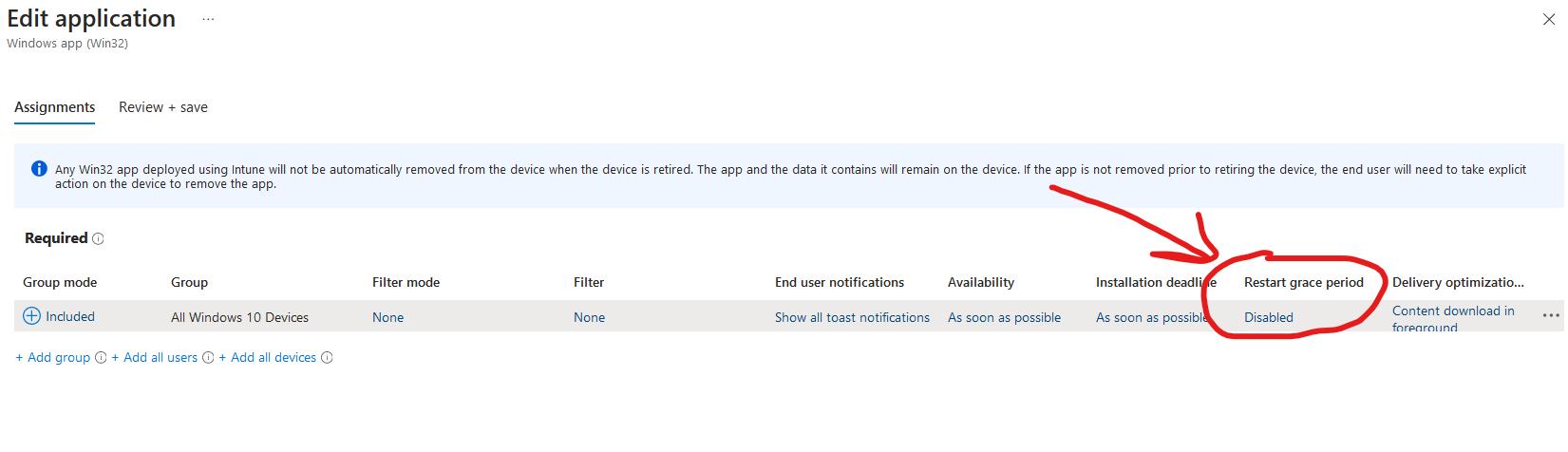
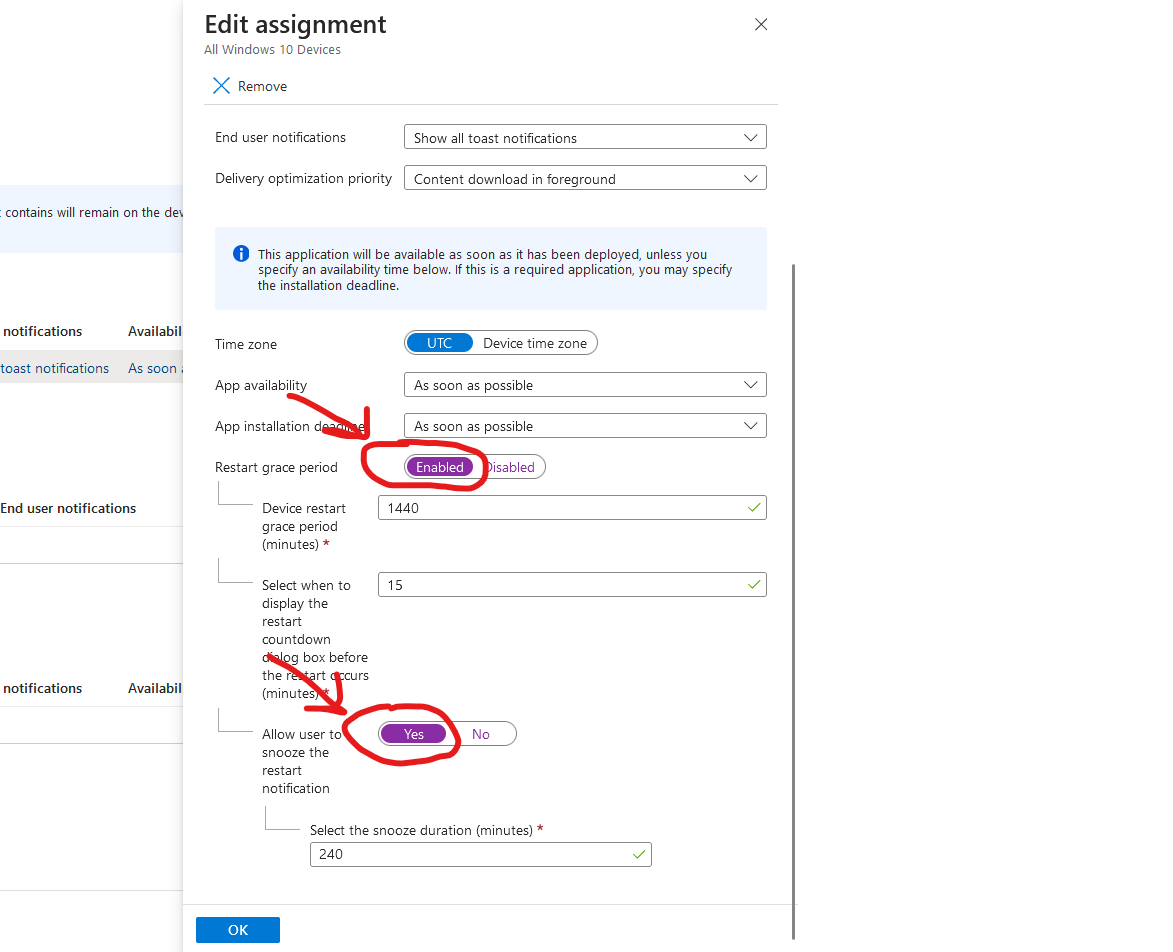
<p>Enabling this option unlocks the <strong>Restart Grace Period</strong> settings on your app assignments. This allows you to notify users and give them multiple reminders before the reboot is enforced.</p>

<p><img src="/assets/images/2026-01-22-Intune-CompanyPortal-OSPatches/AppInstallBehaviour.png?raw=true" alt="RestartApp" title="Intune restart on Win32 app" />
<img src="/assets/images/2026-01-22-Intune-CompanyPortal-OSPatches/AppRestart-graceperiod-1.png?raw=true" alt="RestartApp" title="Intune grace period on Win32 app" />
<img src="/assets/images/2026-01-22-Intune-CompanyPortal-OSPatches/AppRestart-graceperiod-2.png?raw=true" alt="RestartApp" title="Intune grace period on Win32 app" /></p>

<blockquote>
  <p><strong>Important:</strong><br />
Always enable the <strong>Restart Grace Period</strong> when using<br />
<strong>“Intune will force a mandatory reboot”</strong>.</p>

  <p>If the grace period is not configured, installing the update will result in an <strong>immediate and abrupt reboot</strong>, which is a very poor user experience.</p>
</blockquote>

<h2 id="user-experience">User Experience</h2>

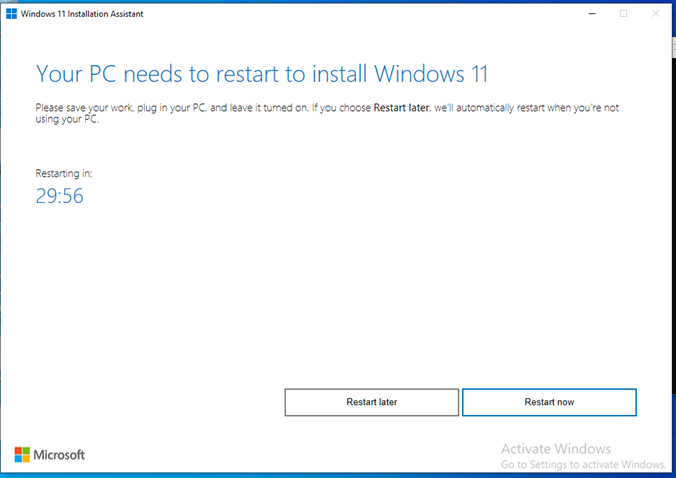
<p>The user can enter company portal and install the app. After installing the app, they will be prompted to reboot, as shown below:
<img src="/assets/images/2026-01-22-Intune-CompanyPortal-OSPatches/UX-1.png?raw=true" alt="UserExperience" title="User Experience" />
<img src="/assets/images/2026-01-22-Intune-CompanyPortal-OSPatches/UX-2.png?raw=true" alt="UserExperience" title="User Experience" />
<img src="/assets/images/2026-01-22-Intune-CompanyPortal-OSPatches/UX-3.png?raw=true" alt="UserExperience" title="User Experience" /></p>

<h2 id="wrapping-up">Wrapping up</h2>

<p>It’s far from ideal to have to offer updates this way, but I’ve received a large number of questions and concerns from customers regarding this January 2026 update. That’s why I felt compelled to write this post and demonstrate a practical approach for manually packaging and offering the update to end users.</p>

<p>By using a <strong>Win32 app</strong> and making it available in <strong>Company Portal</strong>, you can treat this update as a <em>fix-on-failure</em>—guiding users to install it only when needed. Of course, you can also push it proactively to all users if many are affected, but in that case, I strongly recommend increasing the restart grace period so users have more than 24 hours to complete the mandatory reboot.</p>

<p>That’s all for now.<br />
Have a great day ahead 🙂</p>]]></content><author><name>Mads Johansen</name></author><category term="Intune" /><category term="Windows Updates" /><category term="January 2026-01 Out-of-Band patch" /><category term="Company Portal" /><summary type="html"><![CDATA[This suddenly came up out of the blue: installing or offering Windows updates manually via Intune and the Company Portal.]]></summary></entry><entry><title type="html">Windows Updates in 2026</title><link href="https://evil365.com/intune/Windows-Updates-Early2026/" rel="alternate" type="text/html" title="Windows Updates in 2026" /><published>2026-01-14T00:00:00+00:00</published><updated>2026-01-14T00:00:00+00:00</updated><id>https://evil365.com/intune/Windows-Updates-Early2026</id><content type="html" xml:base="https://evil365.com/intune/Windows-Updates-Early2026/"><![CDATA[<p>It’s early 2026, our hangovers have barely passed, but life must go on. Microsoft is off to an early and great start in 2026 with some great new changes.</p>

<p><img src="/assets/images/2026-14-01-WindowsUpdates-Intune-Early2026/Thumbnail.png?raw=true" alt="WindowsUpdates" title="Windows Update during OOBE" /></p>

<h2 id="updates-during-esp">Updates during ESP</h2>

<p>Windows Updates during ESP is making a comeback (for the 3rd time), let’s hope this time it goes well, as Microsoft previous attempts of rolling it out hasn’t gone according to plan. The option to disable it in ESP has already been there for a while, but the button hasn’t really done anything as the feature was rolled back.</p>

<p><img src="/assets/images/2026-14-01-WindowsUpdates-Intune-Early2026/WindowsUpdate-OOBE.png?raw=true" alt="WindowsUpdates" title="Windows Update during OOBE" /></p>

<p>If you don’t want any updates during ESP, be sure to set this option to “No” in your ESP. Otherwise this functionality will be re-implemented in the January 2026 as pr. comms from Microsoft. Carefully consider the impact of using this feature, as it will most likely significantly increase the enrollment time of your windows devices.</p>

<p>More about this in this <a href="https://techcommunity.microsoft.com/blog/windows-itpro-blog/get-ready-for-windows-quality-updates-out-of-the-box/4434498">blog post from Microsoft</a></p>

<h2 id="gradual-rollout-functionality-is-back">Gradual rollout functionality is back</h2>

<p>The gradual rollout functionality was deprecated in October 2025, much to the dismay of a lot of IT Admins. The Gradual rollout functionality was great in many ways, as it allowed the update engine in Intune to carve out smaller groups of devices and offer feature updates in small chunks rather than offering it at the same time to all devices in a group. This allowed IT Admins more leeway in regards to testing and gauging impact of the rollout of a new feature update.</p>

<p>But Microsoft must have received a lot of pushback when they removed this feature, because they have decided to re-implement it. It’s already available today. I wasn’t even aware before a few of my customers reached out to me and asked about it. Looking at “What’s new” pages, it looks like it was just silently re-implemented. I would love to link to a blog post from Microsoft, but as of this date, also after confirming with a few folks from Microsoft, it seems to have been silently implemented again. I’m sure some comms will be sent out soon.</p>

<p><img src="/assets/images/2026-14-01-WindowsUpdates-Intune-Early2026/GradualRollout.png?raw=true" alt="GradualRollout" title="Gradual Rollout" /></p>

<p>That’s all for now.</p>

<p>Happy new years to everyone :)</p>]]></content><author><name>Mads Johansen</name></author><category term="Intune" /><category term="Windows Updates" /><category term="Intune" /><category term="Updates during ESP" /><summary type="html"><![CDATA[It’s early 2026, our hangovers have barely passed, but life must go on. Microsoft is off to an early and great start in 2026 with some great new changes.]]></summary></entry><entry><title type="html">Whats up with the Secure Boot certificates expiring in 2026?</title><link href="https://evil365.com/intune/SecureBoot-Cert-Expiration/" rel="alternate" type="text/html" title="Whats up with the Secure Boot certificates expiring in 2026?" /><published>2025-11-19T00:00:00+00:00</published><updated>2025-11-19T00:00:00+00:00</updated><id>https://evil365.com/intune/SecureBoot-Cert-Expiration</id><content type="html" xml:base="https://evil365.com/intune/SecureBoot-Cert-Expiration/"><![CDATA[<blockquote>
  <p><strong>UPDATED 25th of February 2026</strong>: Microsoft hosted 2 AMA’s that gave us a lot more information about how all of this is going to work. You can find the link for for the December 2025 <a href="https://techcommunity.microsoft.com/event/WindowsEvents/ama-secure-boot/4472784?after=MjUuOXwyLjF8aXwxMHwxMzI6MHxpbnQsNDQ3NjkwMCw0NDc2ODgw&amp;topicRepliesSort=postTimeDesc">here</a> and the February 2026 one <a href="https://www.youtube.com/watch?v=EscGJTKHPdw">here</a></p>
</blockquote>

<p>If you manage Windows devices, you might have noticed some alerts about Secure Boot certificates expiring in 2026. This is a common concern, but there’s no need to panic. I’ve noticed some conflicting information about to manage this issue, hence this blog post to clear things up.</p>

<p><img src="/assets/images/2025-09-03-SecureBoot-Cert-Expiration/Thumbnail.png?raw=true" alt="Thumbnail" title="Thumbnail" /></p>

<h2 id="what-you-need-to-know">What you need to know</h2>

<ul>
  <li>The existing 2011-era certificates (KEK CA 2011, UEFI CA 2011, and Production PCA 2011) are expiring in mid‑2026, which would disrupt Secure Boot security.</li>
  <li>Failing to update the boot certificates could result in the following implications:</li>
</ul>

<ol>
  <li>Lose the ability to install Secure Boot security updates after June 2026.</li>
  <li>Not trust third-party software signed with new certificates after June 2026.</li>
  <li>Not receive security fixes for Windows Boot Manager by October 2026.</li>
</ol>

<p><a href="https://techcommunity.microsoft.com/blog/windows-itpro-blog/act-now-secure-boot-certificates-expire-in-june-2026/4426856">Source</a></p>

<h2 id="deploying-the-updated-secure-boot-certificates">Deploying the updated Secure Boot certificates</h2>

<p>You have several options for deploying the secure boot certificates. The most interesting options are the following:</p>

<h3 id="option-1---automatic-rollout-via-high-confidence-buckets">Option 1 - Automatic rollout via High-confidence buckets</h3>

<p>This is the most hands-off approach, but it also requires a bit of faith that your device has been placed into one of Microsoft’s “high-confidence buckets.” If it hasn’t, the device won’t automatically receive the updated Secure Boot certificates. But otherwise note that this option is turned on by default, and is one you have to opt-out of, if you don’t want to be part of the automatic rollout.</p>

<p>Microsoft describes this process as follows:</p>

<blockquote>
  <p>“Microsoft may automatically include high-confidence device groups in monthly updates based on diagnostic data shared to date, to benefit systems and organizations that cannot share diagnostic data. This step does not require diagnostic data to be enabled.” <a href="https://support.microsoft.com/en-us/topic/secure-boot-certificate-updates-guidance-for-it-professionals-and-organizations-e2b43f9f-b424-42df-bc6a-8476db65ab2f#bkmk_automated_deployment_assists">(Source)</a></p>
</blockquote>

<p><strong>Microsoft hosted an AMA the 10th of December 2025 where they clarified the following:</strong></p>
<blockquote>
  <p>“A high-confidence device refers to one that Microsoft can reliably identify and update automatically through Windows Update without additional intervention. These devices typically meet criteria such as: Trusted diagnostic data signals confirming the device’s identity and compatibility, Secure Boot enabled and using supported UEFI firmware, Running a supported Windows version that can receive updates and No anomalies in the boot chain or firmware keys that could block the update process.”</p>
</blockquote>

<p>There should be no harm in letting Microsoft update devices via this channel, but if you want to opt-out of this option for whatever reason, you can set a policy to opt out using Intune.</p>

<p><img src="/assets/images/2025-09-03-SecureBoot-Cert-Expiration/SettingsCatalog-OptOut.png?raw=true" alt="Policy" title="High Confidence Opt-out" /></p>

<h3 id="option-2---automatic-rollout-via-microsoft-controlled-feature-rollout-cfr">Option 2 - Automatic rollout via Microsoft Controlled Feature Rollout (CFR)</h3>

<p>By deploying this policy you will participate in a Microsoft-managed rollout also known as Controlled-feature rollout (CFR). This rollout will be fully controlled by Microsoft, and usually CFRs involves a careful and staggered rollout approach based on certain criteria, grouping devices by hardware and firmware, monitoring feedback channels, and pausing if issues appear. In other words: With this option you are also completely in the hands of Microsoft with this one, but it differentiates slightly from the High-Confidence option. Expect the CFR-rollout option to be slower.</p>

<p>For this option to work you need to ensure you are sending required or optional diagnostic data to Microsoft. If you are already using WufB or Autopatch you probably already are doing it, but know that in March 2025 Autopatch revoked the policy they deploy by default to do this on your behalf (Ref: MC996580). If you want to be sure, you can craft your own policy and apply to devices in scope. Look for the “Allow Telemetry” setting in the settings catalog. <a href="https://learn.microsoft.com/en-us/windows/deployment/update/wufb-reports-configuration-intune#settings-catalog">Source</a></p>

<p><img src="/assets/images/2025-09-03-SecureBoot-Cert-Expiration/SettingsCatalog-TelemetryPolicy.png?raw=true" alt="Policy" title="Telemetry Settings Catalog Policy" /></p>

<p>If you want to let Microsoft managed the rollout via the CFR process, search for “Secure Boot” in the settings catalog to find the relevant policies.
<img src="/assets/images/2025-09-03-SecureBoot-Cert-Expiration/SettingsCatalog-MicrosoftManaged.png?raw=true" alt="Policy" title="Microsoft managed rollout of secure boot certs" /></p>

<h3 id="option-3---self-managed-rollout-using-intune-policies">Option 3 - Self-managed rollout using Intune policies</h3>

<p>If you want to manage the rollout of the secure boot certificates yourself, search for “Secure Boot” in the settings catalog to find the relevant policies.
<img src="/assets/images/2025-09-03-SecureBoot-Cert-Expiration/SettingsCatalog-SelfManaged.png?raw=true" alt="Policy" title="Self-managed rollout of secure boot certs" /></p>

<p>This option can be highly desirable if you want to be in complete control yourself, as this allows you to roll this policy out in your own rings/waves. This option also doesn’t require for you to send diagnostic data to Microsoft.</p>

<blockquote>
  <p>NOTE: There is a known issue where this policy can fail with an error code 65000 - It is due to be fixed by February 27 2026 (<a href="https://support.microsoft.com/en-us/topic/microsoft-intune-method-of-secure-boot-for-windows-devices-with-it-managed-updates-1c4cf9a3-8983-40c8-924f-44d9c959889d">Source</a>). In the meantime, you can apply the corresponding registry key instead, using a PowerShell script. You can download it from <a href="https://github.com/thisisevilevil/IntunePublic/blob/main/PowerShell%20Scripts/Secure%20Boot%20Certificate%20Deployment/Deploy-SecureBootCert-SelfRollout.ps1">my github here</a></p>
</blockquote>

<h3 id="monitoring-for-updated-certificates">Monitoring for updated certificates</h3>

<p>Microsoft released a new report in Intune to monitor for the updated certificates. You can find it by navigating to the following blade: Reports &gt; Windows Quality Updates &gt; Reports &gt; Secure Boot Status</p>

<p><img src="/assets/images/2025-09-03-SecureBoot-Cert-Expiration/SecureBootMonitoring.png?raw=true" alt="Monitoring" title="Monitoring for updated certs" /></p>

<h2 id="wrapping-up">Wrapping up</h2>

<p>Microsoft is already working with OEM’s to push out BIOS Updates, where the updated certificates are present. So if you are already keeping your BIOS Up-to-date in your org, chances are, you already received the updated certificates. You can find articles from <a href="https://www.dell.com/support/kbdoc/en-us/000347876/microsoft-2011-secure-boot-certificate-expiration">Dell</a> and <a href="https://support.hp.com/us-en/document/ish_13070353-13070429-16">HP</a> about how they are adressing things from their end. They are already updating the certificates from their end via BIOS Updates on newer models.</p>

<p>If your devices are in an air-gapped environment or with limited network connectivity, you will have to update these certificates manually. See <a href="https://techcommunity.microsoft.com/blog/windows-itpro-blog/updating-microsoft-secure-boot-keys/4055324">this article</a> for more information.</p>

<p>The full Microsoft guidance is available <a href="https://support.microsoft.com/en-us/topic/windows-devices-for-businesses-and-organizations-with-it-managed-updates-e2b43f9f-b424-42df-bc6a-8476db65ab2f">in this article</a></p>

<p>Plenty of scripts online suggest you need to handle this certificate update yourself. For most organizations, that’s not the case. Microsoft will take care of it or you can choose to take matters into your own hands with new easy-to-deploy intune policies. If you’re running hardware from major OEMs like Dell, HP, or Lenovo and keeping them updated, you’re likely already covered to a certain extent. Also, this is issue is also present on servers, so make sure to prepare accordingly for your servers as well.</p>

<p>Hopefully this clears up the confusion and saves you from chasing unnecessary “DIY fixes.”.</p>

<p>Thanks for reading — and have an awesome day :)</p>]]></content><author><name>Mads Johansen</name></author><category term="Intune" /><category term="Secure Boot certificates" /><category term="Certificate expiry" /><summary type="html"><![CDATA[UPDATED 25th of February 2026: Microsoft hosted 2 AMA’s that gave us a lot more information about how all of this is going to work. You can find the link for for the December 2025 here and the February 2026 one here]]></summary></entry><entry><title type="html">Intel vPro Integration with Intune</title><link href="https://evil365.com/intune/IntelvProPortal-Intune-Integration/" rel="alternate" type="text/html" title="Intel vPro Integration with Intune" /><published>2025-10-08T00:00:00+00:00</published><updated>2025-10-08T00:00:00+00:00</updated><id>https://evil365.com/intune/IntelvProPortal-Intune-Integration</id><content type="html" xml:base="https://evil365.com/intune/IntelvProPortal-Intune-Integration/"><![CDATA[<p>Intel vPro and Intel AMT (Active Management Technology) are probably some of the most overlooked features in enterprises. It also seems like many companies purchase Intel vPro–capable devices without actually activating or using the features. Why is that? A combination of lack of awareness, lack of documentation, complexity—and perhaps a hint of paranoia due to some old articles suggesting that the CIA, NSA, and aliens from outer space have backdoors into Intel AMT.</p>

<p>I helped configure Intel AMT in a retail environment some years back, but that was before any cloud functionality existed, so we maintained an Excel sheet with the IPs, users, and passwords for each workstation. That was fun (not really…). Over the years, the tools to configure Intel AMT have had many names and variations: Intel ACU, Intel SCS, and Intel EMA. Don’t be surprised if you hear about those. Many companies already purchase vPro-capable devices, but they’re not using the functionality. Some might also have a split estate where some devices are vPro-capable and others are not.</p>

<p>But let’s pause for a second and look at what Intel vPro and Intel AMT actually are:</p>

<ul>
  <li><strong>A business-centric PC platform</strong> providing enhanced hardware-based security, remote manageability, and business-grade performance.</li>
  <li><strong>Remote Management (Intel® AMT):</strong> Allows IT staff to remotely monitor, diagnose, and resolve issues on computers—regardless of their location or whether the operating system is running. For the server people out there, think of this like a miniature version of HPE iLO or Dell iDRAC.</li>
  <li><strong>Hardware-Enhanced Security:</strong> Provides multilayered security features built into the hardware to protect against malware, safeguard user credentials, and secure data—even at the firmware level.</li>
</ul>

<p>In other words: if organizations had these capabilities when the CrowdStrike debacle ensued, they would have been much better off recovering their devices remotely.</p>

<p>I exchanged a few emails and calls with the good folks at Intel supporting this new Intel vPro portal. They helped me set up my tenant and troubleshoot a few issues I encountered.<br />
Let’s take a look at how to configure Intel AMT with these new tools from Microsoft and Intel, while also gaining some insight into the direction this product is heading in the near future.</p>

<p><img src="/assets/images/2025-10-10-IntelvPro-Intune-Integration/Thumbnail.png?raw=true" alt="IntelvPro" title="Thumbnail" /></p>

<h2 id="configuring-intel-vpro-with-intune-integration">Configuring Intel vPro with Intune integration</h2>

<p>Microsoft recently announced Intel vPro Portal integration in Intune. <a href="https://learn.microsoft.com/en-us/intune/intune-service/fundamentals/whats-new#intel-vpro-fleet-services-integration-in-intune-partner-portal-">Released on September 15, 2025, for Intune service release 2509</a>, this feature allows you to integrate your Intune tenant with the <a href="https://vprofleet.intel.com/">Intel vPro portal</a>.</p>

<p>This automatically provisions your Intel vPro tenant as well.</p>

<p><img src="/assets/images/2025-10-10-IntelvPro-Intune-Integration/IntelvPro-Portal.png?raw=true" alt="IntelvPro" title="Intel vPro Intune Portal Integration" /></p>

<p>Some quick gotchas regarding the Intel vPro portal:</p>

<ol>
  <li><strong>Save your passphrase.</strong> The passphrase adds an extra layer of security to your user account and should not be confused with your login password. I highly recommend ticking the box “Store passphrase in browser” when signing in to avoid retyping it repeatedly.</li>
  <li>By signing up for Entra ID integration, you eliminate the need to use passwords when signing in to the portal. Users you onboard to the Intel vPro portal should only use their passphrase. In the future, we’ll also get the option to completely disable passphrases.</li>
  <li>If you want to provide access to someone else, you can manually create their user account in the vPro portal under <strong>User Management</strong>. In the future, we’ll get an option that allows automatic user provisioning in the Intel vPro portal based on Entra ID groups.</li>
  <li>Currently, it’s only possible to provision devices in what’s referred to as <strong>Client Control Mode (CCM)</strong>. If you want to remotely take over a device via the portal, the end user will need to provide a code to the IT Admin—similar to Quick Assist or Remote Help. However, in the near future, we’ll get the option to provision devices in <strong>Admin Control Mode (ACM)</strong> with this new portal. This mode is ideal for factory areas, retail spaces, or kiosk environments where unattended access is required, as the device has no user. Devices in ACM allow IT to take control without requiring user consent.</li>
</ol>

<blockquote>
  <p><strong>NOTE:</strong> If you’ve signed up for Entra ID integration, make sure the “Email” attribute is populated for the users you’re trying to onboard. Otherwise, SSO will not work, and you’ll see an error message in the Intel vPro portal when signing in. Intel is working on migrating to using the UPN instead of the Email attribute, as it’s common for admin accounts to have a blank email field in Entra.</p>
</blockquote>

<h3 id="onboarding-devices-to-vpro">Onboarding devices to vPro</h3>

<p>Onboarding devices to Intel vPro is super simple in the new setup flow:</p>

<ol>
  <li>Configure an endpoint group or use the default endpoint group—each endpoint group requires its own onboarding package/application.</li>
  <li>On the right-hand side, open the dropdown menu under <strong>Actions</strong> and select <strong>Download agent files</strong>.</li>
</ol>

<p><img src="/assets/images/2025-10-10-IntelvPro-Intune-Integration/DownloadeAgentFiles.png?raw=true" alt="IntelvPro" title="Download agent files" /></p>

<ol>
  <li>Download both files and create an Intune package using the Intune Content Prep Tool. Do not rename the files, and keep both files in the same folder when creating the <code class="language-plaintext highlighter-rouge">.intunewin</code> file.</li>
  <li>Finally, upload the app to Intune as a Win32 app. The default install/uninstall commands are prepopulated, and you can use the default MSI detection method as well.</li>
</ol>

<p>I created a PowerShell script based on some Intel-sample scripts, you can use as a custom requirement script, that ensures only targeting Intel vPro-capable devices. This will prevent devices that are not vPro capable to be onboarded in the Intel vPro portal. You can download the script from my github <a href="https://github.com/thisisevilevil/IntunePublic/blob/main/PowerShell%20Scripts/CSME-DiscoverySmbios-Mads.ps1">here</a>.
When you create the Win32 app, under the requirement section, you can add a script requirement.</p>

<p><strong>Output data type: Integer</strong> - <strong>Operator: Equals</strong> - <strong>Value: 1</strong></p>

<p><img src="/assets/images/2025-10-10-IntelvPro-Intune-Integration/CustomRequirement-Script.png?raw=true" alt="IntelvPro" title="Requirement script for Win32 app" /></p>

<p>Once the package is ready, you can start rolling it out to your vPro-ready devices. As always, test on a few devices first before rolling it out broadly. Also consider how you group your devices into Endpoint Groups. Endpoint Groups are important if you want to limit who can perform remote actions and take control of devices—assigning specific endpoint groups to specific IT admins.</p>

<p>Once the package is installed, the device will automatically onboard itself into the Intel vPro portal.</p>

<p>If everything works correctly, you will now be able to remotely power on, powercycle and remotely access the device amongst other things.</p>

<p><img src="/assets/images/2025-10-10-IntelvPro-Intune-Integration/IntelvPro-DeviceActions-1.png?raw=true" alt="IntelvPro" title="Intel vPro Intune Portal Integration" />
<img src="/assets/images/2025-10-10-IntelvPro-Intune-Integration/IntelvPro-DeviceActions-2.png?raw=true" alt="IntelvPro" title="Intel vPro Intune Portal Integration" /></p>

<h2 id="onboarding-and-troubleshooting-tips">Onboarding and troubleshooting tips</h2>

<p>There can be various causes to lack of connectivity to Cira, so here is a few tips/tricks to make sure the device will always be able to connect:</p>

<ol>
  <li>Ensure BIOS and Intel Management Engine drivers are fully up to date. If you’re running a very old version, it’s likely vulnerable and may not work correctly. Always stay up to date with drivers and BIOS updates from your OEM.</li>
  <li>Make sure your device is vPro-capable. It’s possible to onboard devices that aren’t vPro-capable, but they’ll never connect. The <strong>Intel Management and Security</strong> app in Windows will also look empty, since either vPro is not supported or Intel MEBx is disabled in BIOS.
<img src="/assets/images/2025-10-10-IntelvPro-Intune-Integration/IntelMEApp-vPro-notsupported.png?raw=true" alt="IntelvPro" title="Intel ME - vPro not supported" /></li>
  <li>Ensure the device is connected via Ethernet or Wi-Fi. However, be aware that <strong>802.1x connections (certificate-based authentication)</strong> are currently not supported. Support for this will be added later.</li>
  <li>If your device is hibernating or gone to sleep, it’s likely you will not be able to connect to the device remotely or perform any power actions. This is partially due to the fact that we want to prevent powering on devices that is in a bag, to prevent overheating. If you are managing a factory floor or kiosk devices, I recommend disabling sleep to retain connectivity towards AMT.</li>
  <li>If your device isn’t connecting, check the following:
    <ul>
      <li>Verify Intel MEBx is enabled in the BIOS. If you’ve previously modified it, you might need to unprovision it. Most OEMs ship devices in an unprovisioned state, allowing them to seamlessly onboard once the package is deployed.</li>
      <li>Open the <strong>Intel Management and Security</strong> app on the device and check the status. It should look similar to the examples below if everything is working as expected.</li>
    </ul>
  </li>
</ol>

<p><img src="/assets/images/2025-10-10-IntelvPro-Intune-Integration/IntelME_Configured_1.png?raw=true" alt="IntelvPro" title="Intel vPro Intune Portal Integration" /><br />
<img src="/assets/images/2025-10-10-IntelvPro-Intune-Integration/IntelME_Configured_2.png?raw=true" alt="IntelvPro" title="Intel vPro Intune Portal Integration" /></p>

<p>In the vPro portal, it should show <strong>“Cira Connected”</strong> and <strong>“Power On”</strong> with green indicators once it’s onboarded, as shown below:<br />
<img src="/assets/images/2025-10-10-IntelvPro-Intune-Integration/IntelvPro-Portal-DeviceConfigured-1.png?raw=true" alt="IntelvPro" title="Intel vPro Intune Portal Integration" /></p>

<h2 id="final-words">Final words</h2>

<p>Intel AMT has historically been a pain to configure, manage, and maintain—but with this new portal and the integration with Intune and Entra, things are really starting to look good. Intel AMT and the remote capabilities it provides can be a huge help in scenarios where the OS isn’t booting, allowing IT to take control remotely of the device even when it’s offline. The unattended access feature will also be a great alternative to TeamViewer or other remote support tools once it’s released.</p>

<p>If you are already using Intel EMA, you will find that this new portal is missing a lot of features. Intel EMA is a self-hosted appliance in Azure that’s been around for a few years, but I can only surmise that due to complexity and low adoption rates, Intel is pivoting towards this new cloud portal to make adoption and onboarding a breeze for IT Admins. So think of this new Intel vPro portal as version 1.0, with many more things to come.</p>

<p>With this new portal and integration, we now have a streamlined and simple approach to onboarding and configuring devices for Intel vPro and AMT—which is awesome!</p>]]></content><author><name>Mads Johansen</name></author><category term="Intune" /><category term="Intel vPro" /><category term="vPro Integration Intune" /><category term="Intel AMT" /><category term="Intel Cira" /><summary type="html"><![CDATA[Intel vPro and Intel AMT (Active Management Technology) are probably some of the most overlooked features in enterprises. It also seems like many companies purchase Intel vPro–capable devices without actually activating or using the features. Why is that? A combination of lack of awareness, lack of documentation, complexity—and perhaps a hint of paranoia due to some old articles suggesting that the CIA, NSA, and aliens from outer space have backdoors into Intel AMT.]]></summary></entry><entry><title type="html">Autopilot, TAP, and the Reboot Problem</title><link href="https://evil365.com/intune/TAP-Autopilot-Reboots/" rel="alternate" type="text/html" title="Autopilot, TAP, and the Reboot Problem" /><published>2025-09-24T00:00:00+00:00</published><updated>2025-09-24T00:00:00+00:00</updated><id>https://evil365.com/intune/TAP-Autopilot-Reboots</id><content type="html" xml:base="https://evil365.com/intune/TAP-Autopilot-Reboots/"><![CDATA[<p>Temporary Access Pass (TAP) has been around for a while, but when I talk to customers, it’s often not on their radar. I’ve recently helped several customers use TAP for new hires so they can enroll their Autopilot devices without a password.</p>

<p>There are plenty of articles that explain what TAP is and its use cases. Here are the <a href="https://learn.microsoft.com/en-us/entra/identity/authentication/howto-authentication-temporary-access-pass">official docs from Microsoft</a>.</p>

<p>You’ll also find many blog posts about TAP. Some are great, while others lack detail or contain outdated information. TAP and Autopilot enrollments has evolved in the past year, which is why I wanted to share an updated perspective. I’ve also spoken with Microsoft internally about the current user experience.</p>

<p>So what’s the fuss about?</p>

<p><img src="/assets/images/2025-09-26-TAP-And-Autopilot/ConfusedUser.png?raw=true" alt="Confused" title="Confused User" /></p>

<h2 id="autopilot-enrollment-and-unexpected-reboots">Autopilot enrollment and (un)expected reboots</h2>

<p>This has been known in the community for years, but here’s a quick recap:</p>

<ul>
  <li>During Autopilot enrollment, if a reboot occurs, the cached user token is lost. This forces the user to sign in again, often with additional MFA prompts/Sign-in, before they can set up Windows Hello for Business (WHfB).</li>
  <li>Common policies that cause reboots include Windows Update, Security Baseline, Device Control policies, and AppLocker. Rudy Ooms has a great post explaining how to pinpoint which policies triggered a reboot—<a href="https://patchmypc.com/blog/autopilot-unexpected-reboot-what-really-triggers-a-device-restart-and-how-to-fix-it/">read it here</a>. Alternatively you can also check out <a href="https://learn.microsoft.com/en-us/autopilot/troubleshooting-faq#what-are-some-of-the-known-policies-that-conflict-with-windows-autopilot-">these docs from Microsoft</a></li>
  <li>A known workaround is assigning reboot-causing apps or policies to user groups instead of device groups. For apps, you can also disable mandatory reboots.</li>
</ul>

<p>This helps, but avoiding reboots entirely has side effects:</p>

<ol>
  <li><strong>Device Health Attestation (DHA):</strong> Requires a reboot to check compliance items like BitLocker, Secure Boot, and Code Integrity. Without it, the device shows as non-compliant.<br />
<img src="/assets/images/2025-09-26-TAP-And-Autopilot/DHA-Bitlocker.png?raw=true" alt="Compliance" title="Compliance Policy DHA" /></li>
  <li><strong>Security features:</strong> Device Guard and Virtualization-Based Security (VBS) need a reboot to activate. These are included by default in the Security Baseline.</li>
  <li><strong>User-based targeting:</strong> Assigning to users instead of devices can cause apps and policies to follow users onto shared or secondary devices, which isn’t always desirable.</li>
</ol>

<h2 id="enrolling-an-autopilot-device-with-tap--with-reboots">Enrolling an Autopilot device with TAP – with reboots</h2>

<p>Here’s where things get messy. If a TAP is used and the Autopilot process includes reboots, some odd behavior appears.</p>

<p>The flow looks like this:<br />
A) User starts Autopilot enrollment with TAP<br />
B) Device reboots in the device setup phase</p>

<p>C) After reboot, the login screen shows “Other user” with a “Sign in” button. The user must press the button twice before the TAP prompt (<a href="https://learn.microsoft.com/en-us/windows/security/identity-protection/web-sign-in/?tabs=intune">web sign-in</a>) appears. Alternatively, they can use <strong>Sign-in options → globe</strong>.</p>

<p>Some blogs and videos show this as normal. But it’s not—it’s poor user experience. This should be treated as a bug. Let’s call it <strong>Problem #1</strong>.<br />
<img src="/assets/images/2025-09-26-TAP-And-Autopilot/OtherUser-1.png?raw=true" alt="OtherUser" title="Other User - Sign in screen" /><br />
<img src="/assets/images/2025-09-26-TAP-And-Autopilot/OtherUser-2.png?raw=true" alt="OtherUser" title="Other User - Sign in screen" /></p>

<p>D) After enrollment finishes, the user sets up Windows Hello. Problem solved? Not really. But the user is now on the desktop.<br />
E) When the device is locked, after the user is on the desktop, the same issue from step C reappears. Also, Clicking the PIN button as a sign in option for some reason shows “Username” and “PIN”.</p>

<p>The user can unlock the device either by using TAP again or by entering UPN + PIN from Windows Hello enrollment. This is <strong>Problem #2</strong>.<br />
<img src="/assets/images/2025-09-26-TAP-And-Autopilot/OtherUser-LockScreen-1.png?raw=true" alt="OtherUser" title="Other User - Lockscreen" /><br />
<img src="/assets/images/2025-09-26-TAP-And-Autopilot/OtherUser-LockScreen-UserPass.png?raw=true" alt="OtherUser" title="Other User - Lockscreen" /></p>

<p>I raised this with someone at Microsoft. They were aware of the workaround (assigning reboot-causing apps/policies to users), but advised against relying on it since reboots can never be fully eliminated. Future platform changes could introduce new reboots at any point.</p>

<p>What surprised me was their explanation of <strong>Problem #2</strong>: The user actually didn’t sign in with windows hello, even when it’s configured in this scenario, so it is not active, which explains the odd sign-in screen after device has been locked.</p>

<p>Other experts I’ve communicated with, otherwise often deal with this by targeting reboot-causing apps/policies to users. For DHA compliance, they add a grace period and schedule a forced reboot later.</p>

<h2 id="alternative-workaround-to-esp-or-not-to-esp">Alternative workaround: To ESP or not to ESP</h2>

<p>One customer I work with is reluctant to change their targeting strategy in Intune. They want to keep all core policies and core apps assigned to devices. They’ve also logged a support ticket with Microsoft, but as I told them, this may take months—and Microsoft may not even classify it as a bug.</p>

<p>So is there another short-term option/workaround?</p>

<p><strong>Turn off the ESP.</strong></p>

<p><img src="/assets/images/2025-09-26-TAP-And-Autopilot/NoESP.png?raw=true" alt="NoESP" title="Turn ESP Off" /></p>

<p>This feels counterintuitive. The Enrollment Status Page (ESP) is designed to make sure all core policies and core apps are in place before the user reaches the desktop. But if you disable ESP, here’s what happens:<br />
a) User signs in with TAP</p>

<p>b) Within 30–60 seconds, they’re taken to WHfB enrollment</p>

<p>c) After WHfB enrollment, they land directly on the desktop—without Problems #1 and #2.</p>

<p>From the user’s perspective, this is fantastic. They can start working almost immediately.</p>

<p>From IT and Security’s perspective, not so much—because no apps or policies are present once the user hits the desktop</p>

<p><strong>Applications:</strong> Critical apps can be installed via PowerShell (Intune platform scripts). These run before Win32 or LoB apps. It’s not elegant, but it works reliably.</p>

<p><strong>Policies:</strong> In testing, most policies applied within 1–2 minutes after hitting the desktop. The only major issue is users who open Edge too soon will get extra sign-in prompts, while certificates and WiFi Profiles will also be slightly delayed.</p>

<p><strong>Compliance and security:</strong> For DHA checks like BitLocker, you’ll need a reboot later. To force a reboot at some point, we have several options, which includes:<br />
a) Marking an app in Intune with <strong>“Intune will force a mandatory reboot.”</strong> Just remember to configure the restart grace period so users get a warning instead of an abrupt restart.<br />
   <img src="/assets/images/2025-09-26-TAP-And-Autopilot/AppAssignment-1.png?raw=true" alt="Appassignment" title="App assignment: Mandatory Reboot" /><br />
   <img src="/assets/images/2025-09-26-TAP-And-Autopilot/AppAssignment-2.png?raw=true" alt="Appassignment" title="App assignment: Restart Grace Period" /></p>

<p>b) An alternative option is to use a PowerShell script (run as current user) that prompts the user to reboot within X amount of minutes. If they click “No,” the final reboot won’t run. This is just a PoC, to provide some inspiration.
 You can find it here <a href="https://github.com/thisisevilevil/IntunePublic/blob/main/PowerShell%20Scripts/Prompt-UserReboot.ps1">here</a>.</p>

<p>Can be assigned as a platform script in current-user context like so:
 <img src="/assets/images/2025-09-26-TAP-And-Autopilot/FinishSetup-UserPrompt-Assignment.png?raw=true" alt="Appassignment" title="Platform script to prompt for reboot" /></p>

<p>It should look like this for the end user:
 <img src="/assets/images/2025-09-26-TAP-And-Autopilot/FinishSetup-UserPrompt-Reboot.png?raw=true" alt="Appassignment" title="Platform script to prompt for reboot" /></p>

<p>Of course I’m otherwise sure the community can find more creative ways to nudge the user to perform a reboot</p>

<h2 id="final-words">Final words</h2>

<p>Reboots during Autopilot have always been a pain point, but we’ve learned to work around them—either by assigning policies/apps to users or by documenting the behavior in onboarding guides so users aren’t confused by extra sign-ins.</p>

<p>The bigger issue today is how TAP + <a href="https://learn.microsoft.com/en-us/windows/security/identity-protection/web-sign-in/?tabs=intune">Web Sign-in</a> behaves during an autopilot enrollment with reboots. That flow really needs attention.</p>

<p>Disabling ESP is a drastic workaround and won’t suit everyone—for example, if you use third-party AV or have many app dependencies. I usually recommend keeping ESP as light as possible, but sometimes you can’t avoid adding a few apps in the ESP due to requirements from the business.</p>

<p>I hope this helped. Have an awesome day :)</p>]]></content><author><name>Mads Johansen</name></author><category term="Intune" /><category term="Temporary Access Pass" /><category term="TAP" /><category term="Autopilot with TAP" /><category term="MFA" /><summary type="html"><![CDATA[Temporary Access Pass (TAP) has been around for a while, but when I talk to customers, it’s often not on their radar. I’ve recently helped several customers use TAP for new hires so they can enroll their Autopilot devices without a password.]]></summary></entry><entry><title type="html">Quality Updates During Autopilot Enrollment is back</title><link href="https://evil365.com/intune/QualityUpdates-During-AutopilotEnrollment/" rel="alternate" type="text/html" title="Quality Updates During Autopilot Enrollment is back" /><published>2025-08-26T00:00:00+00:00</published><updated>2025-08-26T00:00:00+00:00</updated><id>https://evil365.com/intune/QualityUpdates-During-AutopilotEnrollment</id><content type="html" xml:base="https://evil365.com/intune/QualityUpdates-During-AutopilotEnrollment/"><![CDATA[<p>UPDATE 10th of September 2025: Looks like it’s being rolled back (again).</p>
<blockquote>
  <p><strong>Editor’s note 9.8.2025:</strong><br />
This capability has been delayed by a couple of months to help ensure delivery of the best possible experience. You can start configuring the new setting on the Enrollment Status Page (ESP), but you won’t see the new user interface yet. We’ll update this post with a revised timeline as soon as it’s available.</p>
</blockquote>

<p><a href="https://techcommunity.microsoft.com/blog/windows-itpro-blog/get-ready-for-windows-quality-updates-out-of-the-box/4434498">Source</a></p>

<p>In the Intune service release for August 2025, we’re getting some great new additions, which you can read about <a href="https://techcommunity.microsoft.com/blog/microsoftintuneblog/what%E2%80%99s-new-in-microsoft-intune-august-2025/4445612">here</a>.</p>

<p>The big change in this update is the return of Windows quality updates (not feature updates!) during Autopilot enrollment—and they will be enabled by default. You can read the full announcement <a href="https://techcommunity.microsoft.com/blog/windows-itpro-blog/get-ready-for-windows-quality-updates-out-of-the-box/4434498">here</a>.
Some of you might remember the previous attempt to roll this out didn’t go so well, as it was enabled by default without an option to turn it off. This time, we finally have the ability to disable it if needed.</p>

<p>It all sounds great—updates during ESP. We all want our devices to be updated, right? Well, not always. It depends. The main problem with Windows updates being delivered during Autopilot enrollment has always been the extended enrollment time. Depending on the device’s patch level, and the network speed, you might add another 20–30 minutes to the process, which can be significant if you already have several apps blocking your ESP.</p>

<p>Be sure to consider the impact before enabling this feature, and test it first on a few devices to gauge the average increase in enrollment time.</p>

<h2 id="disabling-updates-in-the-esp">Disabling Updates in the ESP</h2>

<p>If you don’t want this feature, you’ll need to go to your ESP (Enrollment Status Page) settings and disable it. By default, it will be turned on.</p>

<p><img src="/assets/images/2025-26-08-Updates-ESP/Toggle-ESP.png?raw=true" alt="ESP" title="ESP Windows Update Toggle" /></p>

<blockquote>
  <p><strong>Note:</strong> If you don’t see this option in your ESP settings yet, it’s because the feature is still rolling out globally.</p>
</blockquote>

<h2 id="final-thoughts">Final Thoughts</h2>

<p>A great addition in the future would be a conditional rule that allows IT admins to enable updates during ESP only if the OS patch level is below a certain build number. The current alternative is to use enrollment restrictions, which block devices from enrolling when they’re below a required patch level. However, this forces the user (or IT) to manually update the device—usually by pressing <strong>Shift+F10</strong> → <code class="language-plaintext highlighter-rouge">control update</code> or similar—before it can be enrolled. Not exactly the best user experience.</p>

<p>For now, though, this is still a very welcome change that has been highly requested for a long time. It’s nice to see it finally here. 🙂</p>]]></content><author><name>Mads Johansen</name></author><category term="Intune" /><category term="Autopilot" /><category term="Quality updates during ESP" /><category term="Cumulative Updates during ESP" /><category term="Updates during ESP" /><summary type="html"><![CDATA[UPDATE 10th of September 2025: Looks like it’s being rolled back (again). Editor’s note 9.8.2025: This capability has been delayed by a couple of months to help ensure delivery of the best possible experience. You can start configuring the new setting on the Enrollment Status Page (ESP), but you won’t see the new user interface yet. We’ll update this post with a revised timeline as soon as it’s available.]]></summary></entry><entry><title type="html">WebView2, Microsoft Edge and Autopilot issues</title><link href="https://evil365.com/intune/WebView2-Edge-Autopilot-issues/" rel="alternate" type="text/html" title="WebView2, Microsoft Edge and Autopilot issues" /><published>2025-08-19T00:00:00+00:00</published><updated>2025-08-19T00:00:00+00:00</updated><id>https://evil365.com/intune/WebView2-Edge-Autopilot-issues</id><content type="html" xml:base="https://evil365.com/intune/WebView2-Edge-Autopilot-issues/"><![CDATA[<p>If you are using Autopilot and re-using the image from your OEM, you are already doing it right. It doesn’t mean all your problems will go away, it’s just different kind of problems. I have been dealing with this issue for a few months, hoping it would go away by itself, but maybe I was naive, hence this blog post.</p>

<p>If you suddenly face an issue where your users are complaining they cannot launch Teams or the new outlook client because of a Webview2 error, right after a finished autopilot enrollment, then read on.</p>

<p><img src="/assets/images/2025-08-19-Webview2-Autopilot-issue/Thumbnail.png?raw=true" alt="Webview error" title="Thumbnail" /></p>

<h2 id="what-is-webview2">What is WebView2</h2>

<p>WebView2 is a web control from Microsoft that lets developers embed web content (HTML, CSS, JavaScript) into their desktop applications. It’s built on the same Microsoft Edge (Chromium) rendering engine, so apps can display modern web experiences without relying on the old Internet Explorer–based WebBrowser control. WebView2 is installed and updated with Microsoft Edge.</p>

<p>The new outlook and teams clients relies on this component to work correctly. What if webview is missing or outdated? Then you will probably face the below error (There are a few variations of this error, but this is one of them)</p>

<p><img src="/assets/images/2025-08-19-Webview2-Autopilot-issue/Webview2-teams-error.png?raw=true" alt="Webview error" title="Webview2 missing" /></p>

<h2 id="why-is-it-happening">Why is it happening</h2>

<p>I’m working with 1 customer where they get devices delivered from the OEM with an ancient Edge version, causing this problem. Microsoft says it’s an OEM issue and the OEM says it’s a Microsoft issue. In the meantime, if you download a Windows 11 24H2 ISO, we can mount the ISO and open the install.wim with 7zip we can take a peak at the Edge version by navigating to ..\1\Program Files (x86)\Microsoft\Edge\Application: 122.0.2365.106</p>

<p><img src="/assets/images/2025-08-19-Webview2-Autopilot-issue/EdgeVersion-MountedWim.png?raw=true" alt="Webview error" title="Edge version in WIM file" /></p>

<p>For good measure, I also fired up a VM and installed Windows to check the Edge version, using the same ISO and the version is the same.</p>

<p>If we look up the date of Edge version 122.0.2365.106 it’s basically from the stoneage: Version 122.0.2365.106: March 21, 2024 (<a href="https://learn.microsoft.com/en-us/deployedge/microsoft-edge-relnote-archive-stable-channel">Source</a>)</p>

<p>And that’s the cause of our issue, the Edge version is simply too old and WebView2 is built-in to Edge. So preferably we need to get it updated before the user lands on the desktop and opens teams or outlook. Based on some testing, Edge should otherwise update itself within 30 minutes after hitting the desktop, but the users that launch teams or new outlook before that, will face the error.</p>

<blockquote>
  <p>NOTE: On further inspection, I found that the Edge version has actually been updated to a much newer version in the latest ISO available from July 2025 (as of this date), and in that ISO, is actually a newer Edge version. But it will probably take a while for OEMs to update to this version</p>
</blockquote>

<h2 id="the-workaround">The workaround</h2>

<p>We can trigger an Edge update by using the following PowerShell command (<a href="https://learn.microsoft.com/en-us/deployedge/deploy-edge-with-windows-10-updates">source</a>):</p>

<pre><code class="language-PowerShell">Start-Process -FilePath "C:\Program Files (x86)\Microsoft\EdgeUpdate\MicrosoftEdgeUpdate.exe" -argumentlist "/silent /install appguid={56EB18F8-B008-4CBD-B6D2-8C97FE7E9062}&amp;appname=Microsoft%20Edge&amp;needsadmin=True"
</code></pre>

<p>We have a couple of options for deploying this with Intune, but I have found the easiest and fastest way is to deploy it as a PowerShell script from Intune (Platform script). PowerShell scripts run before Win32 apps during the autopilot enrollment process. I created a PowerShell script to check for the Edge version and it’s below a certain version, we will update it, otherwise no actions is performed. You can find the script in my github <a href="https://github.com/thisisevilevil/IntunePublic/blob/main/PowerShell%20Scripts/Update-MicrosoftEdge.ps1">here</a>. Assign it like so:</p>

<p><img src="/assets/images/2025-08-19-Webview2-Autopilot-issue/Add-PowerShellScript.png?raw=true" alt="UpdateEdge" title="Edge PowerShell script" />
<img src="/assets/images/2025-08-19-Webview2-Autopilot-issue/UpdateEdge-PowerShellScript.png?raw=true" alt="UpdateEdge" title="Edge PowerShell script" /></p>

<h2 id="final-thoughts">Final thoughts</h2>

<p>Hopefully this issue should go away very soon as it seems like Microsoft already released new ISOs where a much newer version of Edge is included, so I guess it’s just a matter of time. In the meantime, we just need to make sure Edge is updated before the user hits the desktop. You can deploy it as a PowerShell script or Win32 app. Alternatively if you use products like Patch My PC or Robopack you can subsribe to Edge and get it as a Win32 app as well.</p>

<p>That’s all for now. Have a nice day :)</p>]]></content><author><name>Mads Johansen</name></author><category term="Intune" /><category term="Microsoft Edge Outdated" /><category term="WebView2 outdated" /><category term="Teams WebView issue" /><category term="Outlook webview issue" /><summary type="html"><![CDATA[If you are using Autopilot and re-using the image from your OEM, you are already doing it right. It doesn’t mean all your problems will go away, it’s just different kind of problems. I have been dealing with this issue for a few months, hoping it would go away by itself, but maybe I was naive, hence this blog post.]]></summary></entry><entry><title type="html">5 exciting features coming in Windows 11</title><link href="https://evil365.com/windows11/5Exciting-Windows11-Feature/" rel="alternate" type="text/html" title="5 exciting features coming in Windows 11" /><published>2025-06-29T00:00:00+00:00</published><updated>2025-06-29T00:00:00+00:00</updated><id>https://evil365.com/windows11/5Exciting-Windows11-Feature</id><content type="html" xml:base="https://evil365.com/windows11/5Exciting-Windows11-Feature/"><![CDATA[<p>In the not so distant future, we will get some new and awesome features in Windows 11, as always. Here are some of them I find exciting.</p>

<p><img src="/assets/images/2025-06-29-5Windows11-Features-Coming/Thumbnail.png?raw=true" alt="NewWindowsfeatures" title="New Windows Features thumbnail" /></p>

<h2 id="quick-machine-recovery-qmr">Quick Machine Recovery (QMR)</h2>

<p><strong>Quick Machine Recovery (QMR)</strong> aims to reduce downtime when devices encounter critical issues. Instead of lengthy reimaging or rebuild processes, QMR allows devices to quickly recover to a clean and ready state — often within minutes. This is especially valuable for IT teams managing large device fleets or remote workers. What’s even cooler is that Microsoft is looking to build automatic remediation for common OS Boot failures, that makes it easy to guide end-users to fix common issues that could cause a No boot scenario. It’s still in preview, but this technology looks very promising.</p>

<p>Did someone say Crowdstrike? Also, a lot of companies are paying extra for Intel vPro devices, but very few is actually taking advantage of <a href="https://www.intel.com/content/www/us/en/developer/articles/guide/getting-started-with-active-management-technology.html">Intel AMT</a> - why is that? Probably best left for a different blog post.</p>

<p>Rest assured, I think it’s great and sorely needed that Microsoft is entering this space.</p>

<p>👉 <a href="https://techcommunity.microsoft.com/blog/windows-itpro-blog/get-started-with-quick-machine-recovery-in-windows/4398487">Learn more about Quick Machine Recovery</a></p>

<h2 id="local-administrator-protection">Local Administrator Protection</h2>

<p>Local administrator accounts have long been a target for attackers. <strong>Local Administrator Protection</strong> introduces built-in controls that help safeguard these accounts, reducing the risk of privilege escalation and lateral movement during attacks. This feature integrates with existing identity and access management strategies to provide a stronger security posture.</p>

<p>👉 <a href="https://blogs.windows.com/windowsdeveloper/2025/05/19/enhance-your-application-security-with-administrator-protection/">See how Microsoft is protecting local admin accounts</a></p>

<h2 id="a-new-pc-migration-experience">A New PC Migration Experience</h2>

<p>Migrating to a new Windows 11 device is about to become far simpler. The <strong>New PC Migration experience</strong> helps users transfer settings, apps, and data with minimal friction, reducing the setup time and confusion that often comes with getting a new PC. This feature will integrate with Microsoft cloud services to offer a seamless handoff between old and new devices.</p>

<p>👉 <a href="https://blogs.windows.com/windows-insider/2025/06/02/announcing-windows-11-insider-preview-build-26200-5622-dev-channel/">Explore Microsoft’s vision for easier PC migrations</a></p>

<h2 id="smarter-start-menu-pins-with-pingeneration1">Smarter Start Menu Pins with <code class="language-plaintext highlighter-rouge">PinGeneration="1"</code></h2>

<p>Windows 11 is introducing a <strong>one-time pinned apps experience</strong> for the Start menu. With <code class="language-plaintext highlighter-rouge">PinGeneration="1"</code> you will be able to make pinned apps, unpinnable by the end-user, allowing the user to freely customize their own taskbar, even though IT deployed a taskbar policy. For those of you that has been in the game for a while, you probably also remember the plethora of tools that could pin apps to the taskbar, but that suddenly stopped working after a windows udpate. Gone are the days where we need to rely on PowerShell wizardry to apply a one-time configuration to the taskbar.</p>

<p>👉 <a href="https://learn.microsoft.com/en-us/windows/configuration/taskbar/pinned-apps?tabs=intune&amp;pivots=windows-11#pingeneration">More details about that here</a></p>

<h2 id="new-copilot--search-enhancements">New Copilot + Search Enhancements</h2>

<p>Microsoft is re-inventing the <strong>Copilot</strong> experience in Windows 11, making it even more powerful by integrating it deeper into the Search functionality. This means faster, smarter results — whether you’re querying your PC, files, settings, or the web. Copilot is becoming a true AI assistant that helps you get things done more intuitively. Of course they have also increased the security of Windows Recall that made its rounds through the media some time ago. For starters, it’s now no longer enabled by default, and the Recall bits are protected by Windows Hello and is now encrypted.</p>

<p>👉 <a href="https://blogs.windows.com/windows-insider/2025/06/23/announcing-windows-11-insider-preview-build-26120-4452-beta-channel/">Meet Windows Copilot</a></p>

<h2 id="honorary-mention">Honorary mention</h2>

<p>There is a screenshot of a new policy making the rounds on social media, where we can enable a policy to easily remove built-in apps in Windows. If I had a nickel for each Debloater script there exist online, well.. you know what I mean. This is still only on the rumor mill, so take this with a grain of salt for now.</p>

<p>I still know some companies are stuck running autopilot but gets devices delivered with consumer-grade windows images, where software like Mcafee and other 3rd party apps are pre-installed. I don’t think this policy will automatically remove 3rd party software like Mcafee and other junk, but it’s a step in the right direction.</p>

<p>Either way, If Microsoft delivers on this policy, then Microsoft is truly delivering on a request that’s been out there for years, almost ever since Windows 10 was released.</p>

<p><img src="/assets/images/2025-06-29-5Windows11-Features-Coming/ScreenshotPolicy.png?raw=true" alt="RemoveBuiltInApps" title="New Policy / GPO" /></p>

<h2 id="final-thoughts">Final Thoughts</h2>

<p>These features reflect Microsoft’s continued investment in security, manageability, and user experience. Whether you’re an IT admin preparing for deployment or a user eager for smarter tools, Windows 11’s future looks promising. If you ask me what is my favourite upcoming feature, I’d probably have to pick between QMR and the new experience for creating a start menu / pinned taskbar.</p>

<p>How many of these will be present in Windows 25H2 that’s due to be released later this year, I don’t know. For all intents and purposes, it looks like Windows 11 25H2 is a minor update that can be enabled through an enablement package if you are already running Windows 11 24H2. I guess we will have to wait and see :)</p>]]></content><author><name>Mads Johansen</name></author><category term="Windows11" /><category term="Windows 11 new features" /><category term="Windows 11 25H2" /><category term="Local Administrator protection" /><category term="Quick Machine Recovery (QMR)" /><category term="PinGeneration" /><category term="PC Migration" /><summary type="html"><![CDATA[In the not so distant future, we will get some new and awesome features in Windows 11, as always. Here are some of them I find exciting.]]></summary></entry></feed>