

MDMWinsOverGP doesn’t win as often as you think
If you’ve been working with Intune for a while, especially in environments that are moving away from Active Directory and Group Policy, chances are you’ve come across the setting MDMWinsOverGP. It’s often one of the first settings that gets deployed in a migration project, and I get why. On paper it sounds like the perfect safety net: “If Group Policy and Intune disagree, Intune wins”. Done, problem solved.
Except it’s not. In this blog post I want to go through the common misconceptions about this setting, why it doesn’t cover nearly as much as many IT Admins think it does, and why I think, in most cases, it’s masking a problem instead of solving it.

What is MDMWinsOverGP?
MDMWinsOverGP is a setting in the ControlPolicyConflict area of the Policy CSP. In Intune you’ll find it in the Settings Catalog under Control Policy Conflict > MDM Wins Over GP:
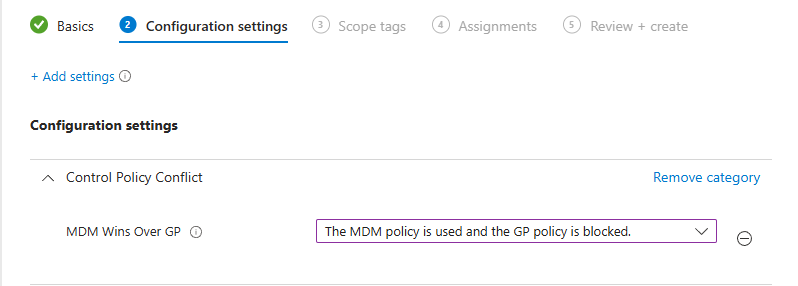
When enabled, if a policy is configured both from Group Policy and from MDM, the MDM value is the one that will be applied on the device.
Microsoft introduced this setting many years ago, back when co-existence between Group Policy and MDM was a big pain point, and organizations needed a way to start moving workloads to MDM without first cleaning up every single GPO in their environment. That’s a perfectly valid reason for it to exist. My issue is not with why it was made. My issue is with how I see it being used in actual environments today.
The misconception: “Intune always wins now”
Here’s the scenario I keep running into:
- The IT Admin enables MDMWinsOverGP.
- The IT Admin now assumes that every policy deployed from Intune will automatically win over any Group Policy that’s configured for the same thing.
- Nobody cleans up the GPOs, because “it doesn’t matter anyway, Intune wins”.
The main problem is step 2. MDMWinsOverGP does not cover every setting in Intune.
To be fair to the IT Admins who fell into this trap, it hasn’t always been obvious. For a long time the documentation didn’t spell out the limitations, and the name of the setting itself pretty much tells you “MDM wins over GP”. No asterisk. So it’s no wonder that a lot of us read it as a global switch. Many of the environments I see today had MDMWinsOverGP enabled years ago, based on that understanding, and it has never been revisited since.
Today, Microsoft is pretty clear about how it actually works. The docs now include this note:
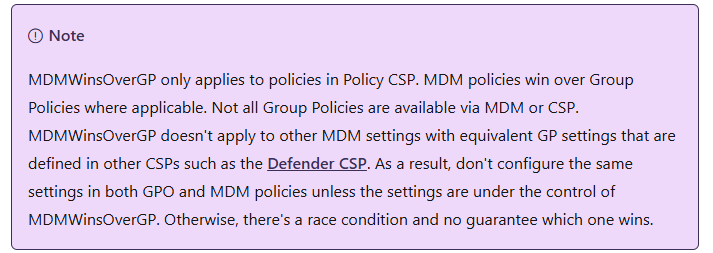
Let’s break down what that note actually says:
- MDMWinsOverGP only applies to policies in the Policy CSP. That’s it. It’s not a global “MDM wins” switch for the entire device.
- Not all Group Policies are available via MDM or CSP. So there will always be some GPOs that have no MDM equivalent at all.
- It doesn’t apply to MDM settings that live in other CSPs, even if those settings have an equivalent Group Policy. The docs use the Defender CSP as an example, but it’s far from the only one.
- If you configure the same setting in both GPO and MDM, and it isn’t under the control of MDMWinsOverGP, there’s a race condition and no guarantee which one wins.
That last point is the important one. Read it again: no guarantee which one wins.
Which settings are not covered?
The Policy CSP is big, but a lot of the things we configure in Intune are delivered through other CSPs. A few examples of areas that have their own CSP, and where you’ll very often also find an equivalent setting in a GPO from the AD days:
- Defender CSP: Some Microsoft Defender Antivirus settings
- Firewall CSP: Windows Firewall profiles and rules
- BitLocker CSP: Encryption settings
- PassportForWork CSP: Windows Hello for Business
- LAPS CSP: Windows LAPS
- AppLocker / ApplicationControl CSP: App control policies
- WiFi CSP and WiredNetwork CSP: Wireless and wired (802.1X) network profiles, the Intune equivalent of the Wireless Network (IEEE 802.11) Policies and Wired Network (IEEE 802.3) Policies in Group Policy
Many of these are exactly the kind of security settings you’d typically find in a “baseline” GPO that has been linked to the workstations OU for the last 10-20 years. And many of the profiles you create in Intune, such as the Endpoint Security profiles, are built on top of these CSPs, not (only) the Policy CSP. As an admin looking at a profile in the Intune portal, it’s not obvious which CSP is doing the work behind the scenes.
So you enable MDMWinsOverGP, you deploy your shiny new Firewall or BitLocker profile from Intune, and you still have the old GPO applying to the same devices. Who wins? It depends. And that’s the problem.
Windows Update is another one that surprises people. Even though the Update settings live in the Policy CSP, MDMWinsOverGP doesn’t apply to them, so a leftover WSUS GPO can keep winning. Microsoft has now added a separate setting just for this, IgnoreWindowsUpdateGroupPolicies, which kind of proves the point. Rudy Ooms has a great deep dive on it over at Patch My PC: Intune Can Now Bypass Windows Update Group Policy.
The conflict you can’t see
This is the part that a lot of people miss. When you have 2 Intune policies that configure the same setting with different values, Intune tells you about it. You’ll see a conflict in the reporting, and you can go and fix it.
But a conflict between Group Policy and Intune doesn’t live in Intune. It lives on the device itself. Intune has no idea that a GPO is also configuring the same setting. From Intune’s point of view, the policy was delivered successfully. Group Policy, on its end, also thinks everything went fine.
So the conflict happens silently, on the device, without anyone knowing about it.
To be fair, there is one exception. For Policy CSP settings with MDMWinsOverGP enabled, the device does keep a record: the MDM diagnostic report has a Blocked Group Policies section listing the Group Policies that were overruled by MDM. But notice the irony here. The only visibility you get is for the settings that are already handled. For the settings in other CSPs, the ones where there’s an actual race condition, there’s no such list. Those are the ones you’d really want to know about.
Sometimes that’s benign. Maybe the GPO and the Intune policy configure the same value, or the setting that wins doesn’t really matter. But other times it causes actual problems:
- A firewall rule you deployed from Intune isn’t there, or a GPO rule you thought was gone is still active.
- Defender exclusions or settings end up being different from what you see in the Intune portal.
- Behavior flips back and forth depending on whether Group Policy or MDM was the last one to process. “It worked yesterday” type of tickets, which are a nightmare to troubleshoot.
- Your Intune reporting says the device is configured correctly, when in reality it isn’t. That’s a false sense of security, and in my opinion that’s worse than knowing you have a problem.
My actual problem with MDMWinsOverGP
Even for the settings that are covered by MDMWinsOverGP, I have a problem with how it’s used.
If Group Policy and Intune are configuring the same setting with different values on the same device, you have a conflict. That’s a real problem in your environment. Enabling MDMWinsOverGP doesn’t fix that problem. The GPO is still there, still being applied, and still telling a different story than your Intune configuration..
In other words, you’re masking a problem instead of solving it.
And the root cause is rarely technical. It’s what I like to call a people problem. Conflicting policies end up on the same device because there’s no process in place to prevent it. Nobody owns the decision of “this setting is now managed from Intune, so the GPO setting gets removed”. There’s no overview of which settings have been moved, and which still live in AD. A technical setting won’t fix that. Processes will.
What to do instead
Instead of relying on MDMWinsOverGP as a safety net, I’d recommend the following:
- Decide where each setting is managed from. A setting should be managed from either Group Policy or Intune. Never both.
- Remove the setting from the GPO when you move it to Intune. Not later. Not “after the migration”. As part of moving it. If a GPO becomes empty, unlink it from the OU.
- Use Group Policy Analytics in Intune. Import your GPOs and see which settings are supported in MDM. It’s a great starting point for planning the migration, and for knowing which settings you’ll have to move.
- Migrate 1 policy at a time, and test it. If you’re migrating policies to Intune, a good approach is to pick the policies 1 by 1, as you move each one to Intune. To test the migration approach, create a test OU with blocked inheritance and link all the pertinent GPOs to it. Then create a corresponding test group in AD (synced to Entra ID, so you can use it in Intune) containing the test devices. Migrate the policies 1 by 1, scope each one to the test group, and unlink the matching GPO from the test OU. That way you can validate each policy on its own, without any conflicts, before rolling it out more broadly.
- Verify on the device.
gpresult /h report.htmlshows you which GPOs are actually applying, and the MDM diagnostic report (Settings > Accounts > Access work or school > Export your management log files) shows you what MDM has configured. Compare the two if you suspect a conflict. - Have a process for it. Make it part of your change management. Whenever someone creates a new Intune policy, the question “is this also configured from a GPO?” should be asked and answered.
Conclusion
MDMWinsOverGP is not evil. It was made for a reason, and there are scenarios where it can make sense as a temporary measure during a migration. But it’s not the “Intune always wins” switch that many IT Admins think it is. It only covers the Policy CSP, it doesn’t cover a lot of the security-related settings you most likely care about, and even for the settings it does cover, it hides conflicts instead of fixing them.
Conflicts between Group Policy and Intune happen silently, on the device, with no indication in Intune that anything is wrong. The only real fix is to not have them in the first place. Clean up your GPOs, decide where each setting is managed from, and put a process in place to keep it that way.
Thanks for reading, and as always, feel free to reach out if you have any questions :)