
When Removing VBScript Breaks Your AMD Chipset Driver
I recently noticed that my AMD X870 chipset drivers had been stuck “installing” via AMDs auto-updater for weeks—yet never actually finishing.
After ignoring it long enough, I finally decided to troubleshoot it. Those drivers had to be updated.
So I manually downloaded the installer and launched it… only to be greeted with this:
“This installer is intended to be deployed only on an AMD system. Existing installation as the requirement is not satisfied.”
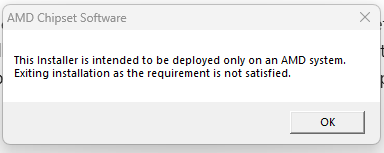
Unless someone broke into my house and secretly replaced my motherboard and CPU with Intel hardware, something was clearly wrong.
Following the Trail with Process Monitor
I fired up Process Monitor to see what the installer was doing behind the scenes.
Almost immediately, I spotted repeated attempts to launch: C:\Windows\SYSWOW64\cscript.exe

This can only mean 1 thing: VBScript.
The Root Cause
Three months ago, I had removed VBScript support from my device.
At the time, it seemed harmless—another legacy component retired.
It turns out AMD’s chipset installer still uses VBScript-based requirement checks.
With VBScript removed, those checks fail silently, and the installer incorrectly assumes the system is not an AMD platform.
In short: No VBScript → broken detection logic → false hardware error.
Why This Is a Bigger Problem
VBScript is living on borrowed time.
Microsoft has officially announced that:
- VBScript will be deprecated in 2027 - FoD will be disabled by default
- It will later be fully removed from Windows
That means every installer, automation script, and macro that still depends on it, is a future outage waiting to happen.
If you believe no one in your organization relies on VBScript anymore, I dare you to try running this on a test device:
DISM /Online /Remove-Capability /CapabilityName:VBSCRIPT~~~~
1 thing is almost certain: Decades worth of Excel macros will break, and will need to be re-written in Javascript, PowerShell or another language. But if you haven’t started already, it’s time to start communicating widely to your organization that this change is happening, so everyone can prepare accordingly.
The Takeaway
VBScript was released almost 30 years ago. Yet in 2026, it’s still being utilized by application packagers, drivers, excel macros etc.
If your packaging, deployment, or automation workflows still depend on VBScript, now is the time to audit and modernize them—before the platform removes it for you.
See this article from Microsoft regarding VBScript deprecation timelines and next steps: https://techcommunity.microsoft.com/blog/windows-itpro-blog/vbscript-deprecation-timelines-and-next-steps/4148301